
One-line Positioning
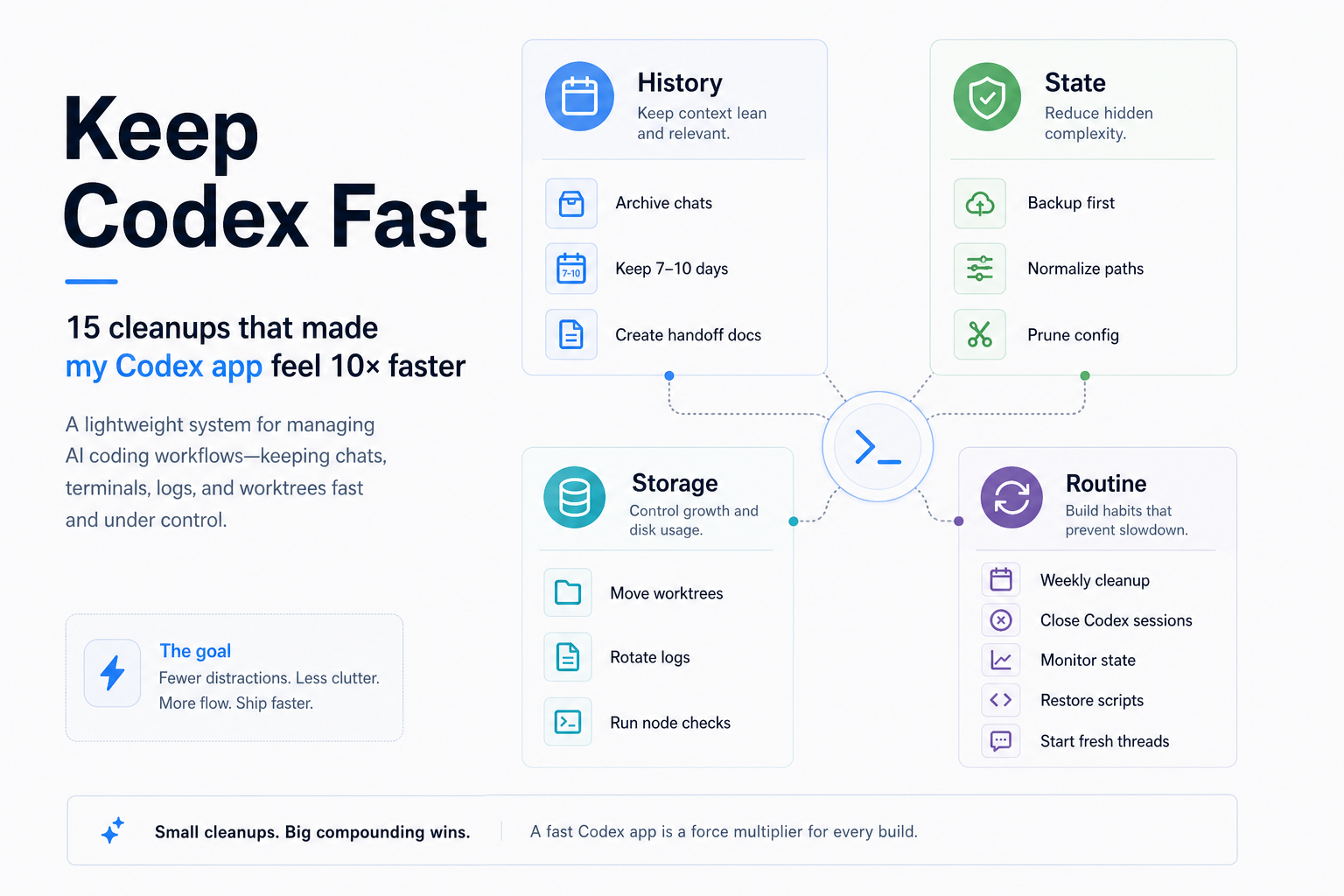
Keep Codex Fast is a local-state maintenance skill for heavy Codex users. It inspects first, creates handoff notes, backs up important state, and then safely archives old sessions, logs, and temporary workspaces that can make the local experience feel heavier over time.
Basic Info
| Item | Info |
|---|---|
| GitHub | https://github.com/vibeforge1111/keep-codex-fast |
| Author | vibeforge1111 |
| License | MIT |
| Main language | Python |
| Default branch | main |
| Positioning | Codex local-state inspection and safe maintenance skill |
| Current traction | About 559 stars and 29 forks, checked on 2026-05-04 |
What Problem Does It Solve?
After using Codex for a long time, many users run into a kind of “heaviness” that is hard to pin down:
- Long conversations keep accumulating.
- Old threads are frequently resumed.
- Multiple repositories are active at the same time.
- Local terminals, dev servers, logs, and workspaces keep piling up.
- You want to clean things up, but worry about deleting useful context.
Keep Codex Fast is not about making the model answer faster. It is about organizing the local runtime state Codex leaves on your machine. Its core principle is intentionally conservative:
Make handoffs first. Archive, don’t delete. Apply changes only when you are ready.
In other words: write continuity notes first, archive instead of deleting, and only apply changes after you have confirmed that you are ready.
This is practical for people who use Codex for real development work. The part that makes cleanup hard is usually not the files themselves. It is the project decisions, debugging paths, failed commands, and next-step plans hidden inside older chats. Keep Codex Fast turns “cleanup” into a safer workflow: inspect first, preserve recoverable context, then archive.
Core Workflow
  flowchart TD
    A[Codex local state becomes heavy] --> B[Read-only inspection]
    B --> C[Generate maintenance report]
    C --> D{Any important old sessions?}
    D -- Yes --> E[Create handoff notes]
    E --> F[Back up important state]
    D -- No --> F
    F --> G[Archive old sessions and workspaces]
    G --> H[Rotate large logs]
    H --> I[Prune stale project references]
    I --> J[Inspect again and confirm results]
The most important part of this flow is the first step: read-only inspection by default. Keep Codex Fast does not immediately move files or delete history. It first reports what local state exists and where the weight is coming from.
1. Read-only Report by Default
The project README makes the default mode clear: it only reports. It does not write files, create backups, move directories, or mutate local Codex state. It helps you see which areas are growing, including active sessions, archived sessions, logs, old workspaces, stale project references, and heavy Node or dev processes.
That makes the first run low-risk. You can treat it as a health check rather than a cleanup operation.
2. Handoffs First
Keep Codex Fast puts special emphasis on handoff notes. A handoff is a small continuity document that records:
- what you are working on;
- what has already changed;
- which files matter;
- which commands or checks have already been run;
- what errors, warnings, or open problems remain;
- what should happen next.
With that document in place, you can archive a heavy old chat and continue from a fresh Codex session without relying on a growing historical thread.
3. Back Up First, Archive Instead of Deleting
When it actually performs maintenance, Keep Codex Fast still takes the conservative path: back up important state first, then move old sessions, stale workspaces, and large logs into an archive location. It removes items from the hot path instead of permanently deleting them.
According to the project description, it can handle:
- old non-pinned active sessions;
- expired worktrees;
- large
logs_2.sqlite*log files; - stale or temporary project references in
config.toml; - extended Windows path inconsistencies such as
\\?\C:\...; - reports for heavy Node or dev processes.
4. Manual Application, Not Automatic Cleanup
The project also draws an important boundary: scheduled maintenance is better suited for reminders and reports, not automatic cleanup. The reason is simple. Automation cannot know which old sessions are still important, or whether a handoff is good enough.
A safer workflow is to inspect regularly, confirm manually, and only apply maintenance after Codex is closed or after explicitly waiting for Codex to exit.
Who Is It For?
Keep Codex Fast is most useful for Codex users who:
- use Codex for development every day;
- work across multiple repositories;
- keep long chat histories;
- often resume old threads for debugging or implementation;
- run multiple local terminals, services, or worktrees;
- want to clean local Codex state without losing useful context.
If you only open Codex occasionally for small questions, you may not feel the value yet. But once Codex becomes part of your daily development workflow, this kind of local-state maintenance becomes increasingly important.
Quick Start
Inside Codex, you can ask it to install the skill directly:
Install the keep-codex-fast skill from https://github.com/vibeforge1111/keep-codex-fastAfter installation, start with a read-only inspection:
Use $keep-codex-fast to inspect my Codex local state and recommend a safe maintenance plan.If the report shows old sessions worth archiving, create a handoff for any project that may continue:
Create a comprehensive handoff document for this repo/session before I archive Codex history.

Include:
- repo/path and branch
- current goal
- what we already completed
- files touched or investigated
- commands/tests already run
- known errors, warnings, or failing checks
- open decisions
- constraints, user preferences, and do-not-touch areas
- the next 3-7 concrete steps

Also include a reactivation prompt I can paste into a fresh Codex chat so it can continue from this handoff without relying on the old chat context.
After important sessions have handoff notes, you can consider safe maintenance:
Use $keep-codex-fast to apply safe Codex maintenance.

Before changing anything, confirm that important active repo chats have handoff docs or do not need them.

Then back up first, archive instead of deleting, move stale worktrees, rotate large logs, prune dead config references, and verify the result.

If Codex is currently running, do not mutate local state. Tell me to close Codex first.
If you prefer running the script directly, the project also provides a CLI path:
python scripts/keep_codex_fast.pyBeyond the read-only report, you can use options such as:
python scripts/keep_codex_fast.py --details
python scripts/keep_codex_fast.py --backup-only
python scripts/keep_codex_fast.py --apply --archive-older-than-days 10 --worktree-older-than-days 7
python scripts/keep_codex_fast.py --apply --wait-for-codex-exit
Conclusion
The value of Keep Codex Fast is not aggressive cleanup. Its value is turning Codex local maintenance into a controlled process: report first, hand off first, back up first, then archive.
For heavy Codex users, old sessions and local state are both a burden and an asset. The project’s approach is practical: extract truly valuable context into handoff notes, move state that does not need to stay on the hot path, and let new Codex sessions start light again.
If your local Codex experience already feels heavier, Keep Codex Fast is worth running in read-only mode first. Even if you do not apply cleanup immediately, it can show which local state is growing and how to handle it safely later.