
One-line positioning
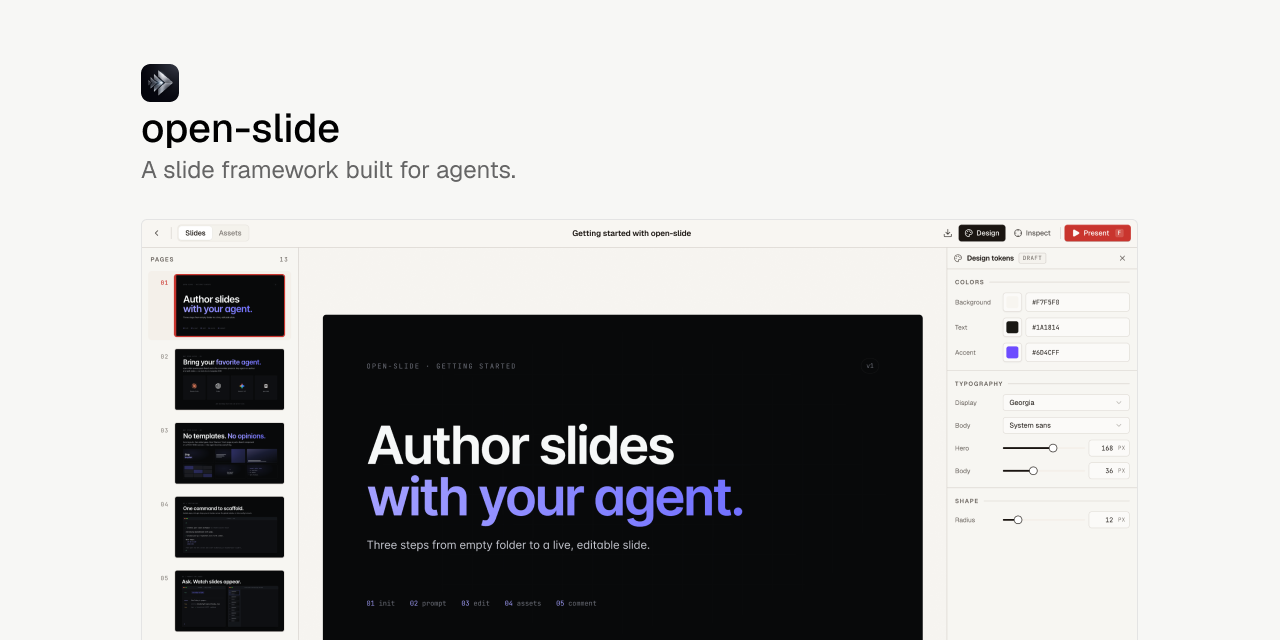
open-slide is a React slide framework built for AI agents: you describe what the deck should be, the agent writes React pages, and open-slide handles the canvas, preview, presentation mode, export, and iteration loop.
Basic information
| Item | Details |
|---|---|
| Project | open-slide |
| Author | 1weiho |
| Positioning | Agent-native slide framework |
| Stack | TypeScript, React, Vite, pnpm, Turbo |
| License | MIT |
| Latest version | @open-slide/core@1.0.6 |
| GitHub popularity | 2.1k+ stars / 143 forks |
| Website | https://open-slide.dev |
| Init command | npx @open-slide/cli init my-slide |
What problem does it solve?
The traditional slide-making workflow usually happens in Keynote, PowerPoint, Figma, or a browser-based editor. You drag elements around, adjust styles, and manually polish layout details.
But a lot of that work can now be handled by AI agents: structure, copy, visual hierarchy, colors, and even code implementation. The idea behind open-slide is simple: if slides are visual code, let agents write that code directly.
open-slide provides a stable slide runtime:
- Each page is a React component.
- Every slide is rendered into a fixed
1920 × 1080canvas. - The framework supports preview, hot reload, presentation mode, and export.
- Agents can follow built-in skills and rules to generate and edit decks.
This means you do not need to set up React, Vite, rendering, and export logic from scratch. You describe the deck you want, the agent writes the pages, and open-slide turns those pages into a presentable and iterable deck.
Core features
1. Agent-native authoring
The main selling point of open-slide is that it is designed around agents writing slides.
It can work with coding agents such as Claude Code, Codex, and Cursor. A scaffolded workspace ships with agent-facing skills, including:
/create-slide: drafts a deck end to end, starting from topic, aesthetic, page count, text density, and motion preference./slide-authoring: gives the agent technical rules for the1920 × 1080canvas, type scale, palette, and layout constraints.
In other words, open-slide is not just a slide component library. It also defines how an agent should author and revise a deck.
2. React-first: every slide is code
open-slide does not introduce a constrained slide DSL. Each slide page is just an arbitrary React component.
That means:
- You can write normal TSX.
- Layout, styling, animation, and component structure are fully controllable.
- Slides can be versioned with Git.
- Agents can edit the source directly.
- The deck can be reviewed like a regular frontend codebase.
The website summarizes this well: A slide is a file. Just React, nothing else.
3. Fixed 1920 × 1080 canvas
Every slide renders into a fixed 1920 × 1080 canvas.
This matters for agent-generated slides because it gives the agent a clear visual boundary. Font sizes, layout, element positions, and proportions can all be designed around a stable canvas.
Compared with a responsive web page, this fixed canvas is closer to a real presentation deck and is easier to export and present.
4. In-browser inspector
open-slide also provides an interesting iteration flow. In the dev server, you can click an element and leave a comment on it.
For example, you can click a heading and write:
- “make this red”
- “shrink the headline”
- “change the copy to Open Slide Rocks”
Those comments are persisted as @slide-comment markers in the source. Then /apply-comments lets the agent read pending comments, update the code, and clear the markers.
This creates a useful loop: let the agent generate the first version, click to leave human feedback, and let the agent apply the next round of changes.
5. Asset manager and logo search
open-slide includes an assets panel for managing images, videos, and fonts per deck.
It also integrates the svgl logo catalogue, so you can search for and insert brand logos without hunting for SVG files manually. This is especially useful for product decks, pitches, and technical talks.
6. Professional presentation mode
open-slide is not limited to dev preview. It includes a proper present mode with:
- fullscreen playback
- keyboard navigation
- current and next slide preview
- speaker notes
- timer
The result is not just a browser page. It can be used as an actual presentation deck.
7. Export to static HTML and PDF
open-slide can export a deck as:
- self-contained static HTML
- print-ready PDF
The static HTML output can be deployed to Vercel, Cloudflare Pages, Netlify, Zeabur, or any static hosting service. It works for both local presenting and online sharing.
8. Slide manager
The project also includes a slide manager for organizing multiple decks with folders, custom emoji, and drag-and-drop reordering.
Once you have more than a few generated decks, that management layer becomes useful.
Who is it for?
open-slide is a good fit for:
- People who want to generate decks quickly with Claude Code, Codex, or Cursor.
- Developers who prefer “slides as code.”
- Teams that need presentable decks for technical plans, product demos, or project updates.
- Users who want slide decks to be versioned, reviewable, and automatable.
- Anyone tired of manually dragging elements around in traditional slide tools.
It is especially suitable for technical content: architecture explanations, product demos, roadmaps, open-source project introductions, and engineering talks.
Quick start
Initialize a project:
npx @open-slide/cli init my-slide
cd my-slide
pnpm dev
The generated workspace includes the open-slide runtime and agent-related rules. You can ask an agent to generate a deck through /create-slide, or directly edit:
slides/<id>/index.tsxIf you want to work on open-slide itself, the repository is a pnpm + Turbo monorepo:
pnpm install
pnpm dev
pnpm build
pnpm check
pnpm lint
Main directories:
| Path | Description |
|---|---|
packages/core | Core runtime, including home page, slide viewer, present mode, inspector, Vite plugin, and dev/build/preview CLI |
packages/cli | Scaffolder for npx @open-slide/cli init |
apps/demo | Demo workspace used for local development and examples |
Conclusion
open-slide points to a natural new workflow: instead of asking AI to generate a static PowerPoint file, let an agent write a runnable, iterable, and version-controlled slide codebase.
It combines React, a fixed canvas, presentation mode, inspector comments, asset management, and export into a stable runtime for agent-authored decks.
If you already use Claude Code, Codex, or Cursor for content and code generation, open-slide is a good project to try for agent-generated presentations.