
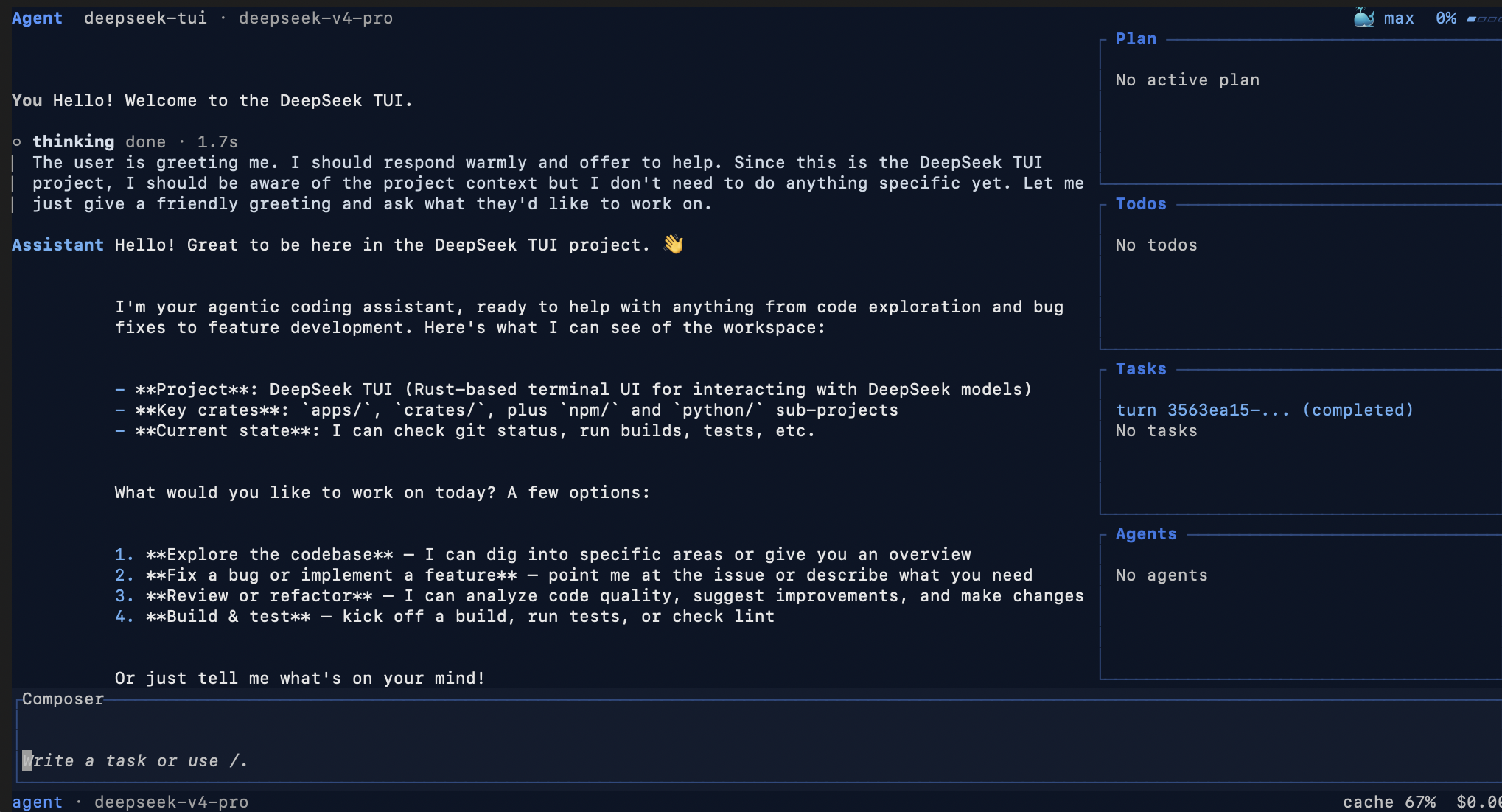
One-sentence positioning
DeepSeek TUI is a terminal-native coding agent built for DeepSeek V4: it brings model reasoning, file editing, shell execution, Git, MCP, sub-agents, LSP diagnostics, and cost tracking into a keyboard-driven TUI workflow.
If many AI coding tools feel like “code completion inside an editor”, DeepSeek TUI feels more like starting a local terminal workspace that can read a project, edit files, run commands, inspect diagnostics, and still keep permissions and cost visible.
Basic information
| Item | Details |
|---|---|
| Project | DeepSeek TUI |
| GitHub | https://github.com/Hmbown/DeepSeek-TUI |
| Positioning | Terminal coding agent for DeepSeek models |
| Main language | Rust |
| License | MIT |
| Target models | DeepSeek V4, including deepseek-v4-pro and deepseek-v4-flash |
| Install options | npm, Cargo, Homebrew, release binaries, Docker |
| Platforms | Linux x64/ARM64, macOS x64/ARM64, Windows x64 |
What problem does it solve?
There are many AI coding tools now, but a lot of them share a similar limitation: they are either too chat-oriented, too editor-completion-oriented, or they hide automation behind layers of UI.
DeepSeek TUI targets a different workflow:
- you like working in the terminal;
- you want the agent to understand the current workspace;
- you want it to read files, edit files, run commands, and manage Git;
- you do not want it to freely mutate the project without boundaries;
- you also want to see context usage, token cost, and prefix-cache behavior.
So it is not just a “DeepSeek chat client in the terminal”. It is a TUI agent designed around real coding workflows.
Core highlights
1. Native fit for DeepSeek V4
The first notable feature is that DeepSeek TUI is not merely a generic OpenAI-compatible wrapper. It is designed around DeepSeek V4’s capabilities.
It supports:
deepseek-v4-pro/deepseek-v4-flash;- 1M-token context windows;
- streaming reasoning blocks;
- prefix-cache-aware cost reporting;
- Auto mode that chooses both model and thinking level for each turn.
This makes it suitable for long-context tasks: reading large repositories, debugging across files, summarizing architecture, and running batched code analysis, not just answering questions about one function.
2. Auto mode chooses both model and thinking level
One of the most distinctive ideas in the project is Auto mode.
Use:
deepseek --model autoOr inside the TUI:
/model autoBefore the real turn runs, Auto mode performs a lightweight routing step and selects:
deepseek-v4-flashordeepseek-v4-pro;- thinking level:
off,high, ormax.
Simple turns can stay on Flash with thinking off. More complex debugging, architecture, security review, or release tasks can move to a stronger model or higher reasoning level.
This is practical because real development work does not need the highest-cost setting on every turn. Letting the tool select a tier per task is more natural than asking the user to manually switch models all the time.
3. A full coding-agent workflow inside the terminal
DeepSeek TUI includes a broad tool suite:
- file operations;
- shell execution;
- Git;
- web search and browsing;
- apply-patch;
- sub-agents;
- MCP servers;
- RLM batched analysis;
- HTTP/SSE runtime API.
Its architecture roughly follows this path:
deepseek dispatcher CLI
→ deepseek-tui companion binary
→ ratatui terminal interface
→ async Agent Engine
→ OpenAI-compatible streaming client
→ typed tool registry and streamed tool results
In other words, it is not just rendering model output in a terminal. It has a real loop for tool calls, session state, task queues, and diagnostic feedback.
4. Plan, Agent, and YOLO make permissions explicit
Many agent tools leave users unsure: will it edit files, run commands, or do risky operations?
DeepSeek TUI exposes three modes:
| Mode | Good for |
|---|---|
| Plan | read-only exploration and planning |
| Agent | default interactive mode with approval gates |
| YOLO | auto-approved mode for trusted or isolated workspaces |
This separation matters. For a new project or unfamiliar repository, start with Plan. After the direction is clear, move to Agent. YOLO should be reserved for trusted, reversible, or isolated environments.
5. side-git rollback without touching your project Git
DeepSeek TUI also has a useful safety mechanism: workspace rollback.
It uses side-git snapshots around turns and supports:
/restoreas well as turn-level rollback such as revert_turn.
The key point is that this does not depend on or pollute your project’s own .git. That is useful for AI coding because an agent may perform many consecutive edits. If one turn goes in the wrong direction, a turn-level rollback is often easier than manually reconstructing the state with Git.
6. LSP diagnostics feed back into the next reasoning turn
Another strong feature is LSP diagnostics.
After edits, the project can collect errors and warnings through language servers such as:
- rust-analyzer;
- pyright;
- typescript-language-server;
- gopls;
- clangd.
These diagnostics are not only shown to the user. They are fed back into the model context before the next reasoning turn. That means the agent can quickly notice type errors, lint issues, and broken references after editing.
This makes it closer to a real development environment than a pure text-editing agent.
7. Cost tracking and prefix-cache visibility
DeepSeek TUI tracks more than model responses. It shows:
- per-turn token usage;
- session-level token usage;
- estimated cost;
- cache hit / miss information;
- prefix-cache-related telemetry.
For long-context agents, this is important. Real project work costs tokens not only for the latest question, but also for history, file content, tool results, and repeated reasoning. Seeing that cost structure gives users more control.
8. Rust binary distribution, not a Node/Python runtime dependency
DeepSeek TUI is written in Rust and distributed as self-contained binaries.
You can install it through npm:
npm install -g deepseek-tuiBut the npm package acts mainly as an installer that downloads the correct prebuilt Rust binaries. The project also supports:
cargo install deepseek-tui-cli --locked
cargo install deepseek-tui --locked
plus Homebrew, direct release binaries, and Docker.
For terminal tools, this is a good distribution model: many installation paths, but a simple runtime.
9. Practical attention to China and ARM64 environments
The README includes mirror-friendly installation notes for mainland China and documents Linux ARM64 prebuilt support.
For npm, for example:
npm install -g deepseek-tui --registry=https://registry.npmmirror.comCargo can also be configured with a Tsinghua mirror.
This may not look like a headline feature, but it directly affects whether users can actually install the tool. For mainland China networks, Raspberry Pi, Graviton, domestic ARM devices, and HarmonyOS PCs, installation quality often decides whether people keep trying.
Who is it for?
DeepSeek TUI is a good fit if you:
- already use the DeepSeek API and want a terminal coding agent;
- prefer TUI, keyboard-driven, command-line workflows;
- often work with large repositories and multi-file tasks;
- want an AI agent that can run commands and edit files, but still has approvals and rollback;
- want MCP, sub-agents, LSP diagnostics, and task queues in a local development workflow;
- care about token usage and cost visibility.
If you already know tools like Codex CLI, Claude Code, or Gemini CLI, DeepSeek TUI’s value is that it turns DeepSeek V4’s context, reasoning, cache, and cost model into a terminal-native development experience.
Quick start
Install:
npm install -g deepseek-tuiCheck version:
deepseek --versionStart:
deepseekConfigure API key ahead of time:
deepseek auth set --provider deepseekCheck auth status:
deepseek auth statusVerify setup:
deepseek doctorFor the first run, avoid jumping straight into YOLO mode. Start with automatic model routing:
deepseek --model autoThen ask it to read the project and plan first:
Read this project structure first. Explain the main modules and startup flow. Do not modify files.After the understanding looks correct, move into implementation or debugging.
Conclusion
DeepSeek TUI is interesting not because it is “another terminal chat UI”, but because it packages DeepSeek V4 into a fairly complete local agent workflow.
Its identity is clear:
- deeply aligned with DeepSeek V4;
- terminal-native TUI;
- Auto mode for model and thinking-level routing;
- Plan / Agent / YOLO permission modes;
- side-git rollback;
- LSP diagnostic feedback;
- MCP, sub-agents, RLM, and HTTP/SSE API;
- visible cost and prefix-cache telemetry.
If you want a coding agent that is more DeepSeek-native, terminal-first, and control-oriented, DeepSeek TUI is worth trying.