
One-sentence positioning
Warp is an AI-native development environment born from the terminal. It brings the command line, coding agents, Git diff review, code review, and commit workflows into one workspace.
Basic information
| Item | Details |
|---|---|
| Project | Warp |
| GitHub | https://github.com/warpdotdev/warp |
| Website | https://warp.dev |
| Positioning | An AI-native development environment evolved from the terminal |
| Main language | Rust |
| Stars / Forks | About 57k Stars / 4.3k Forks |
| License | Mainly AGPL-3.0; warpui_core and warpui are MIT licensed |
| Core capabilities | AI Coding Agent, terminal workspace, Git Diff review, agentic open-source workflows |
| Getting started | Download from the official website; developers can build locally with ./script/bootstrap and ./script/run |
What problem does it solve?
The terminal is powerful, but the daily development workflow is often scattered across many tools: commands in a terminal, code changes in an editor, diffs in a Git client, review in a PR page, and AI coding assistance in yet another window.
Warp’s approach is to pull these actions back into an AI-native workspace. You can ask an agent to work on a task, generate code changes, run checks, inspect the Git diff, leave comments, and prepare commits in one place.
Core highlights
1. A built-in AI Coding Agent
Warp is not just a terminal with a chat box. It includes a coding agent that can work through development tasks: implementing features, changing files, running checks, and producing diffs.
The README also notes that Warp supports its built-in coding agent and can work with external CLI agents such as Claude Code, Codex, Gemini CLI, and others.
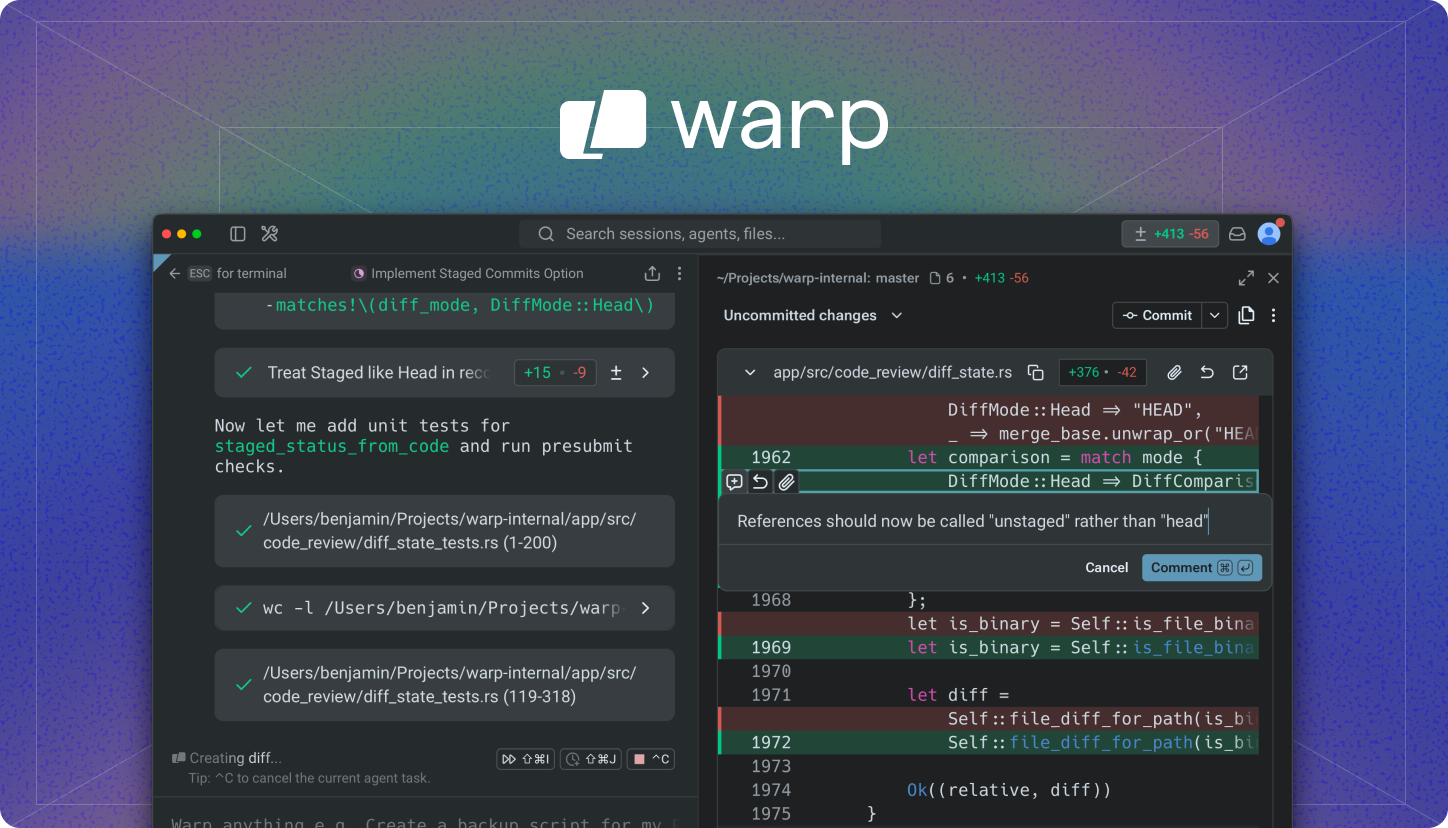
2. Terminal + Agent + Git Diff in one workspace
The screenshot shows a typical development flow:
- the left side displays the agent’s task execution process;
- the right side shows a Git Diff review interface;
- uncommitted changes are visible;
- code can be reviewed line by line;
- comments can be added directly in the diff;
- the workflow can move toward committing changes without leaving the workspace.
That makes Warp feel more like a development workbench than a traditional terminal window.
3. Agentic workflows for open-source collaboration
Warp also provides build.warp.dev, where you can watch Oz agents participate in open-source project workflows, including:
- issue triage;
- spec writing;
- implementation;
- PR review;
- active agent sessions.
This means Warp is not only a personal productivity tool. It is also exploring how agents can participate in open-source maintenance and collaboration.
4. Open-source client code
Warp’s client code is open source, and the repository includes contribution documentation.
The local build flow is roughly:
./script/bootstrap
./script/run
./script/presubmit
It is worth reading if you are interested in modern terminals, AI-agent development workflows, or Rust desktop application architecture.
Who is it for?
Warp is a good fit for:
- developers who spend a lot of time in the terminal;
- people who want to integrate AI coding assistants into real development workflows;
- users who want commands, code changes, diff review, and commits in one interface;
- teams exploring how AI agents can help with open-source maintenance, issue handling, and PR workflows;
- developers studying Rust, desktop apps, terminals, or developer tools.
Quick start
Regular users can download Warp from:
https://www.warp.dev/downloadDevelopers can start from the GitHub repository:
https://github.com/warpdotdev/warpLocal build reference:
./script/bootstrap
./script/run
./script/presubmit
Conclusion
Warp’s most interesting point is that it does not simply add an AI chat panel to a terminal. It puts the AI agent directly into the development workflow.
From task execution and code modification to diff review and committing, Warp tries to combine the tools developers switch between every day into one AI-native workspace. If you already work heavily in the terminal and want to use AI coding tools more systematically, Warp is a project worth watching.